
Training Operations Dashboard
Business Problem
Training and Education (T&E) and CAPS maintained independent training schedules, making it difficult for liability directors and management teams to coordinate upcoming initiatives, training rollouts, and implementation dates.
Existing approaches relied on spreadsheets or standard SharePoint calendars, both of which introduced usability, scalability, and maintenance challenges. Users needed a single source of truth that provided visibility across training initiatives while supporting multiple offices, claim levels, and user roles.
Audience
- Liability Directors
- Regional Training Teams
- Claims Management
- CAPS Team
- Training & Education Team
Learning & Performance Strategy
The challenge was not a lack of training knowledge.
The challenge was access to information.
I applied a performance support approach focused on:
- Just-in-time access to information
- Reduced cognitive load
- Role-based personalization
- Visual identification of training milestones
- Minimizing clicks and navigation friction
The solution was designed so users could quickly identify relevant training activities without requiring extensive onboarding or procedural training.
Solution
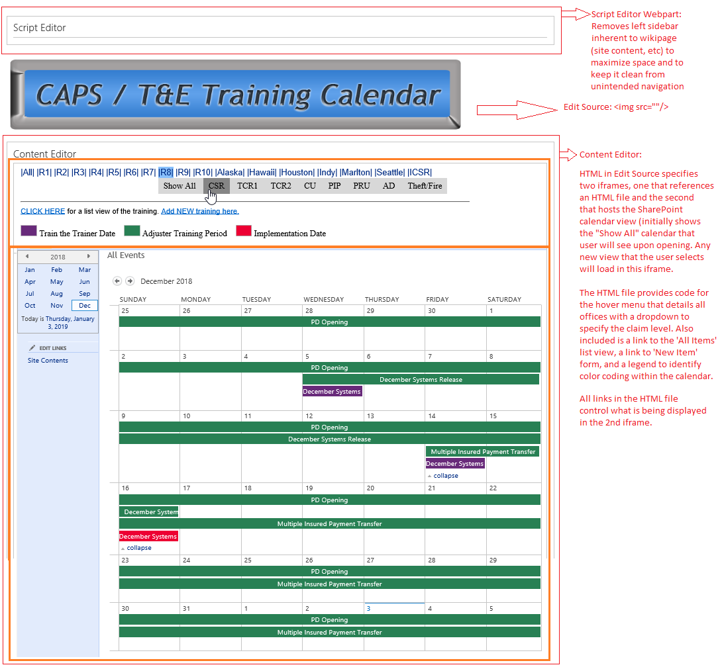
Developed a centralized training management portal using SharePoint, HTML, CSS, JavaScript, and customized calendar views.
Key features included:
- Single-entry submission process
- Role-based permissions
- Personalized regional views
- Visual indicators for training phases
- Interactive filtering
- Consolidated training calendar
- Embedded navigation without redirects
- Color-coded implementation milestones
The final solution supported 16 claim offices, 8 adjuster levels, and required creation of 148 customized views to accommodate unique audience needs.
Design Decisions
To support ease of use and minimize training requirements:
- Replaced complex spreadsheet management with structured forms
- Created a centralized landing page to eliminate unnecessary navigation
- Used visual design and color coding to quickly communicate training status
- Personalized content views to increase relevance
- Removed unnecessary SharePoint interface elements to improve usability
The resulting interface functioned as a learning operations hub rather than a traditional calendar.
Results
- Centralized training visibility across departments
- Reduced administrative effort
- Improved access to training schedules
- Increased relevance through personalized views
- Created a scalable system that could be maintained by future teams
- Reduced onboarding requirements for calendar contributors
What learning theories are actually present here?
You may not have called them this at the time, but they’re all over this project:
Cognitive Load Theory
You reduced information overload by creating audience-specific views and simplifying navigation.
Performance Support
Users could retrieve information at the moment of need rather than memorizing schedules.
User-Centered Design
The interface was designed around director workflows rather than around SharePoint’s default structure.
Information Architecture
You reorganized complex information into a structure users could actually navigate.
Adult Learning Theory
You prioritized relevance, autonomy, and immediate application.